• On sale!
Photo and Video Gallery with Lightbox and Carousel - PrestaShop Module

Photo and Video Gallery with Lightbox and Carousel - PrestaShop Module

Showcase photos of your projects, collections and products in a gallery that matches your site. Choose a grid, masonry, carousel or slideshow layout.

  • Version 1.3.1
  • Last update 2026-10-02
  • PrestaShop compatibility 1.7.8 – 9.x
  • Multistore Not tested
  • Cron job No
  • Languages Polski English Français Deutsch Italiano Español
  • Delivery time Sent automatically by e-mail
View demo Manual
help_outlineAsk about product
Photo and Video Gallery with Lightbox and Carousel - PrestaShop Module

Photo and Video Gallery with Lightbox and Carousel - PrestaShop Module

+48 728 658 005

Call or use the form below


€68.44 excl. VAT

€84.18 incl. VAT

Lowest price in the last 30 days: €34.33

Price history

Regular price Promotional price

Installation ⓘLet me install the module for you. I will install it, test it and verify that it works correctly.

Technical support

Domain ⓘEnter the URL of the domain where the module will be installed.

Quantity

PrestaShop photo and video gallery - lightbox and carousel

Showcase photos of projects, collections and products in a gallery that fits your page. Choose a grid, masonry, carousel or slideshow layout.

Available languages: PL EN FR DE IT ES

Multiple galleries with grid, masonry and justified layouts

Multiple galleries with grid, masonry and justified layouts

You can run several galleries and match the layout to the photo proportions. Grid, masonry and justified let you present a catalog, projects or inspirations in different ways.
Carousels, slideshows and lightbox

Carousels, slideshows and lightbox

The carousel and slideshow suit sequential presentation. The lightbox lets visitors view an enlarged photo without leaving the current page.
Video, tags and lazy loading

Video, tags and lazy loading

Tags help organize the materials, and video support extends the presentation. Lazy loading limits the loading of assets the visitor is not viewing yet.

Who is this module for?

It is a solution for stores showing projects, inspirations and extensive collections of visual materials.

What can you set in the module panel?

Gallery and layout

01 / Gallery and layout

Gallery and layout

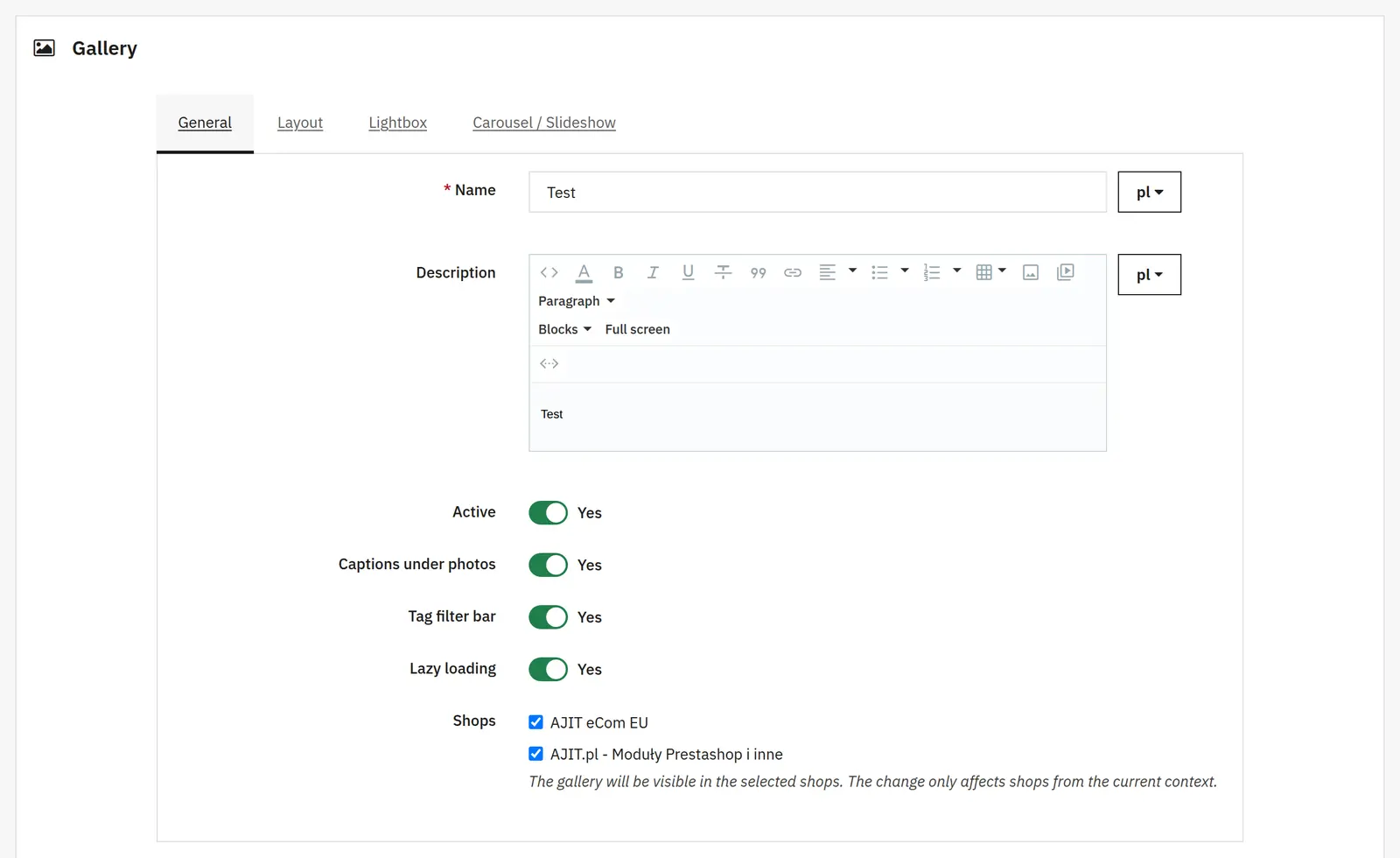
Name, description and status
They define the content identifying the gallery and whether it is available to visitors.
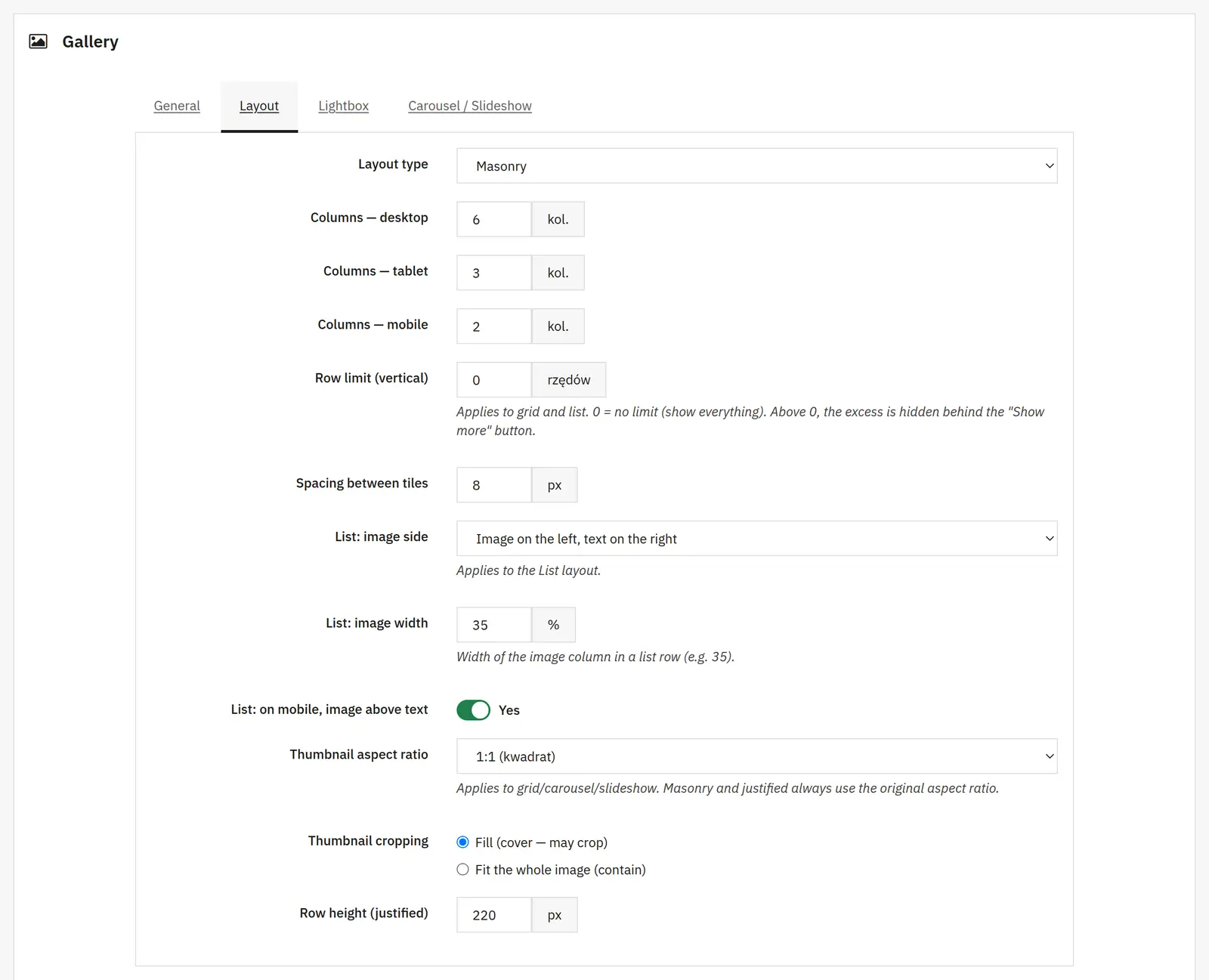
Layout, columns and spacing
You choose the gallery type, separate column counts for desktop, tablet and phone, and the gap between tiles.
Row limit
It limits the visible part of the grid or list layout; the rest can be expanded. A value of 0 shows everything.
List: side, width and mobile
You set the side and width of the photo in a list row and whether the image can move above the text on the phone.
Aspect ratio, cropping and justified height
Aspect ratio and cropping apply to the relevant thumbnails. Masonry and justified keep the source proportions; the row height controls the justified layout.
Captions, tags and lazy loading
You separately enable photo captions, the tag filter bar and deferred image loading.
Browsing photos

02 / Browsing photos

Browsing photos

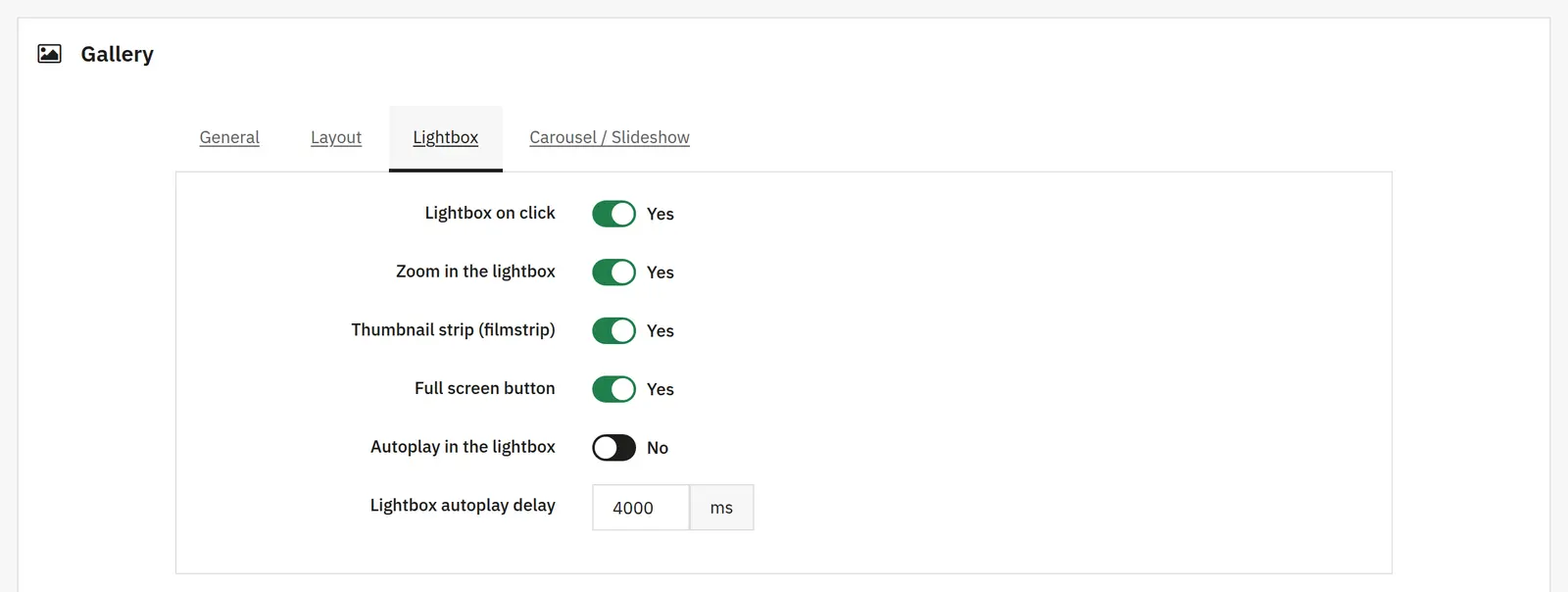
Lightbox, zoom, thumbnails and fullscreen
The switches control opening the enlarged view and the availability of zooming, the thumbnail bar and the fullscreen button.
Lightbox autoplay
It enables automatic switching between materials and sets the change delay.
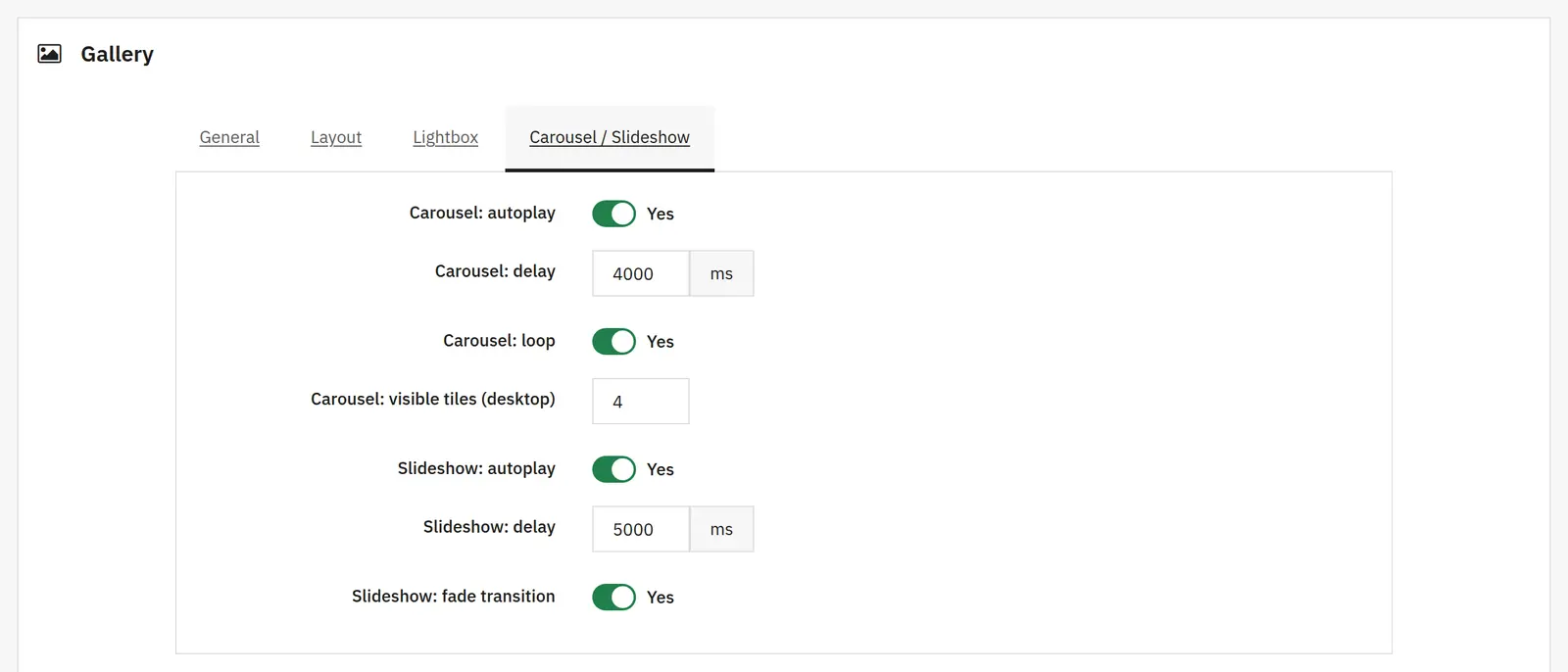
Carousel
You separately set automatic scrolling, the time interval, looping and the number of tiles visible on desktop.
Slideshow
It has its own autoplay switch, change time and fade effect.
Materials and publishing

03 / Materials and publishing

Materials and publishing

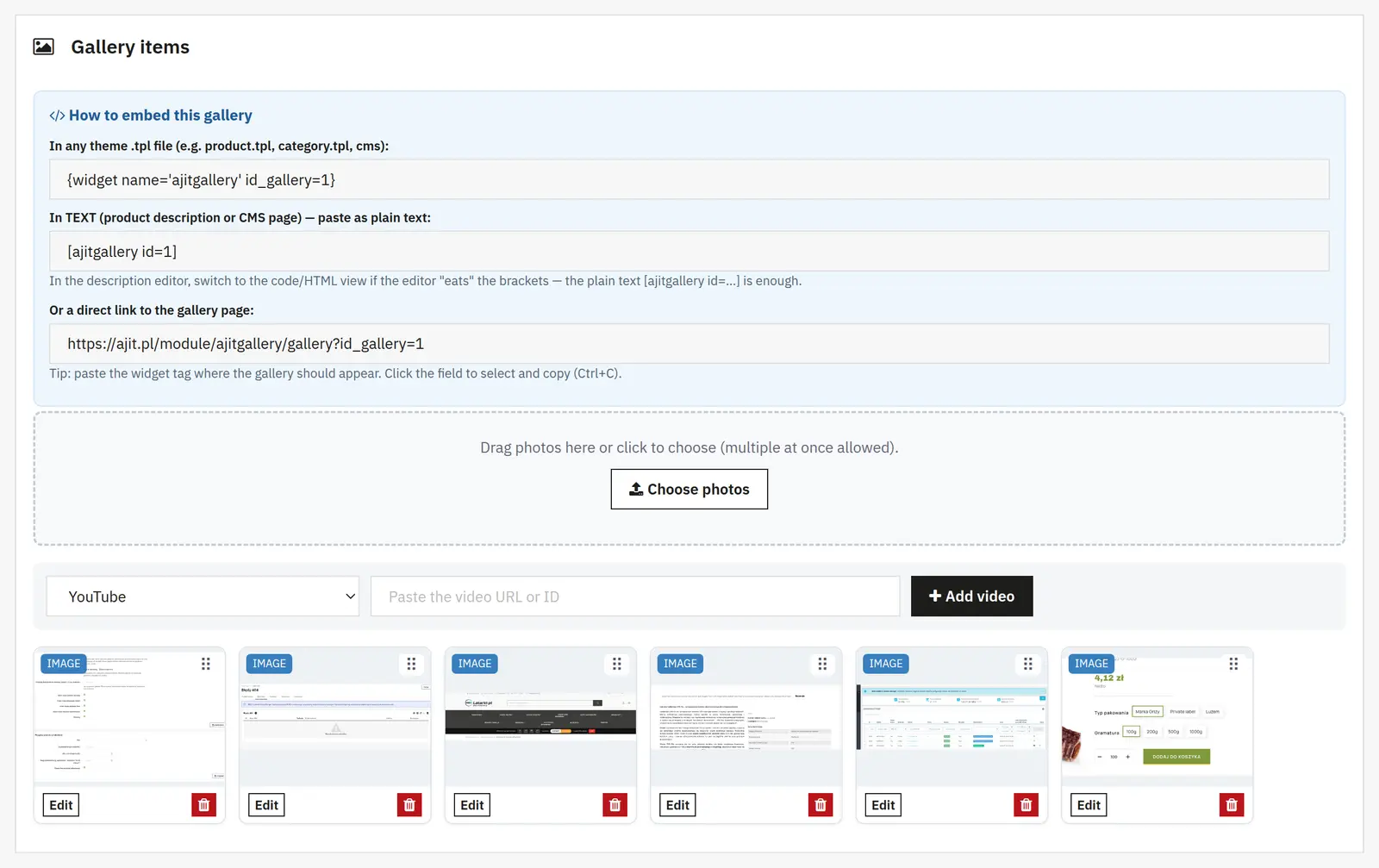
Title, alt, tags and photo status
The title describes the material, alt is the image's alternative text, tags enable filtering, and the status controls its visibility.
Link, link text and target
You can link the whole photo instead of opening the lightbox, or add a text link under the caption. The target selects the same or a new tab.
Video and poster
A video can have a separate image representing it before playback.
Stores and embedding
You choose which stores show the gallery. The panel presents the ways to use it in a template, product content or CMS, plus the gallery's direct URL.
AJIT-GALLERY

Data sheet

Version
1.3.1
Last update
2026-10-02
PrestaShop compatibility
1.7.8 – 9.x
PHP version
7.4 – 8.3
Languages
DE, EN, ES, FR, IT, PL
Multistore
Not tested
Cron job
No
Core overrides
No
Theme compatibility
Any theme
External service required
Not required
Source code
Open, no ionCube
Licence
1 shop (domain), no time limit
Updates
Free for 12 months
Technical support
Free for 6 months
Delivery time
Sent automatically by e-mail
VAT invoice
Yes
Returns
As stated in the terms
Package size
105 kB
Demo link
Link
Documentation
Link

No customer reviews for the moment.

Related Products ( 4 other products in the same category )