

How to check if my data has leaked? A step-by-step guide
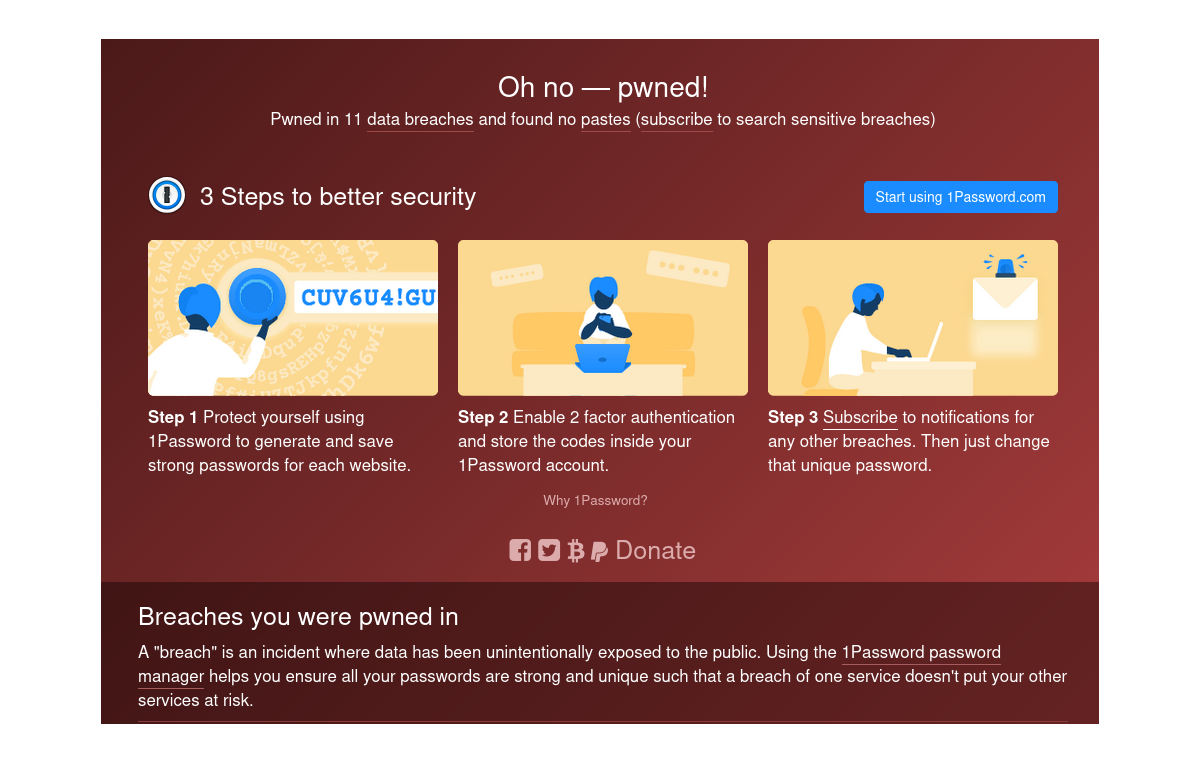
How do you check whether your data has leaked? A step-by-step guide to Have I Been Pwned, plus what to do if your email or password was exposed. How do you check whether my data has leaked? Find out here. In the age of digitalization, our personal data, email addresses and passwords have become a tempting target for cybercriminals. Data can leak as a result of attacks on large companies, gaps in security systems, or even our own carelessness. In this article you will learn how to check whether your data has leaked, how the popular website Have I Been Pwned works, and what to do if a breach is detected. For example, my data has already leaked 11 times, which clearly shows how important it is to take preventive action.
How does data leak?
1. Hacker attacks on companies
Companies that store user data, such as online shops, social media platforms or banks, are often targeted by hackers. When an attack succeeds, the stolen data later ends up online or on the black market.2. Weak system security
Inadequate security, such as a lack of data encryption or outdated systems, can lead to leaks. For example, data may be stored as plain text, which makes it easier to steal.3. Users' unwitting actions
We often put our own data at risk, for example by:- Using the same password on many services.
- Clicking suspicious links in emails (phishing).
- Using untrusted Wi-Fi networks.
4. Internal abuse within companies
Some company employees may deliberately or accidentally share users' data.What is "Have I Been Pwned"?
Have I Been Pwned (HIBP) is a free website created by security expert Troy Hunt. It allows users to check whether their data (e.g. email addresses) has been exposed in a breach. The site uses publicly available databases containing information about breaches to help people detect threats quickly.How does Have I Been Pwned work?
- Entering your email address The user types their email address into the search field on the site. The system searches the breach databases for matches.
- Search result
The site displays a list of breaches that included data linked to the email address entered. The information includes:
- The name of the company or platform the data leaked from.
- The scope of the leak (e.g. emails, passwords, phone numbers).
- The date of the incident.
- Notifications about new breaches The user can sign up to the service to receive notifications about future breaches affecting their email address.
My data has leaked 11 times – what does that mean?
As I mentioned, my data has leaked as many as 11 times, which means that my emails and probably other data have ended up in criminals' databases. For example, the leaks may have been caused by attacks on services such as LinkedIn, Dropbox or Adobe. Each such incident increases the risk that my data will be used for:- Phishing (impersonating well-known services to extract information).
- Account takeovers (if I use similar passwords on different services).
- Identity theft.
How to check whether my data has leaked?
Step 1: Visit the Have I Been Pwned website
Go to https://haveibeenpwned.com/.Step 2: Enter your email address
Enter your email address in the search field and click the "pwned?" button.Step 3: See the results
If your data has been exposed, you will see a list of breaches along with information about what data was stolen and from which platform.Step 4: Sign up for notifications
To stay up to date with future incidents, add your email address to the notification system.What to do if your data has leaked?
1. Change your passwords
If your data has leaked, change your password immediately on the service affected by the incident. Remember:- Use a unique password for every account.
- Choose strong passwords (e.g. a combination of letters, digits and special characters).
2. Enable two-factor authentication (2FA)
Thanks to 2FA, even if someone gets hold of your password, they need an additional code (e.g. an SMS or an authenticator app) to access your account.3. Monitor your accounts
Regularly check your bank accounts, emails and social media for suspicious activity.4. Avoid suspicious messages
If you receive an email or SMS message that looks suspicious, do not click any links or provide personal data.5. Consider an identity monitoring service
Services such as Identity Theft Protection can help you detect and respond to threats quickly.Summary
A data leak is a serious problem that can affect any of us. The Have I Been Pwned website is an extremely useful tool that lets you check whether our data has fallen into the wrong hands. As the author of this article, I can confirm that it is worth monitoring your data regularly – my data has leaked 11 times, which taught me how important it is to protect your identity online.Frequently asked questions (FAQ)
1. Is it safe to use Have I Been Pwned?
Yes, the site does not store the email addresses you enter or share them. You can use it without worry.2. What should I do if my data has leaked?
Change your password immediately, enable two-factor authentication and monitor your accounts.3. Does Have I Been Pwned show all data leaks?
The site presents data from publicly available databases. However, it does not cover all possible incidents.4. What are the safest passwords?
The best passwords are long ones (at least 12 characters) made up of letters, digits and special characters.
5. Is my data in danger now?
If your data has leaked, there is a risk that it will be used. Take appropriate steps to secure your accounts.Get notified about new articles
Subscribe by e-mail or turn on browser notifications — we only send new blog posts, nothing else.




Comments
No comment at this time!
Leave your comment