

PrestaShop XML Errors: Fix the Module List Files in 5 Minutes

After logging in to the PrestaShop 1.6 admin panel, do you see a wall of red messages like those in the picture below? Don’t worry – the shop works… After logging in to the PrestaShop 1.6 admin panel, do you see a wall of red messages with phrases like those in the picture below?
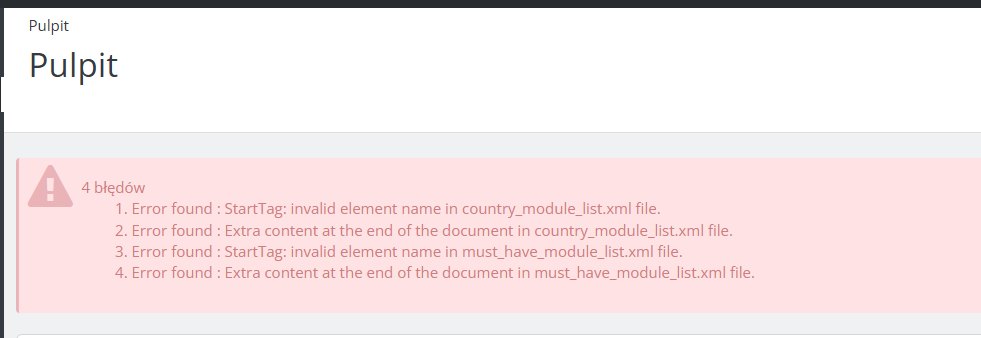 Don’t worry – the shop works normally for customers, and the problem lies in a broken mechanism for fetching data from the external PrestaShop API. In this article we explain where these errors come from and how to eliminate them permanently in two steps via FTP.
Don’t worry – the shop works normally for customers, and the problem lies in a broken mechanism for fetching data from the external PrestaShop API. In this article we explain where these errors come from and how to eliminate them permanently in two steps via FTP.
What are the country_module_list.xml and must_have_modules_list.xml files?
PrestaShop 1.6 and 1.7 has a built-in mechanism that regularly communicates with the external server api.addons.prestashop.com. The purpose of this connection is to download the current list of recommended modules matched to the shop’s country and the list of modules marked as “must-have” (must-have). The downloaded data is saved locally in the/config/xml/ directory in two files:
- default_country_modules_list.xml – the list of modules recommended for a given country,
- must_have_modules_list.xml – the list of modules that PrestaShop considers essential for every shop.
Why do XML errors appear in PrestaShop 1.6?
The errors do not result from a problem with the shop itself or the database. Their real cause is simple: PrestaShop tries to download an XML file from an external server, but instead of valid XML it receives an HTML page – most often a 404 or 503 error page, or a redirect. This happens because the PrestaShop API for version 1.6 has long been unstable or unavailable – this version is no longer officially supported by the vendor. PrestaShop’s XML parser then tries to process this HTML as XML, which ends in an avalanche of syntax error messages:- Opening and ending tag mismatch – HTML tags such as
<head>,<p>,<link>are not valid XML, - EntityRef: expecting ';' – special characters in HTML (e.g.
&in attributes) break the XML parser, - Specification mandates value for attribute async – HTML5 boolean attributes such as
asyncorselectedhave no value, which is not allowed in XML, - Premature end of data – the XML parser ran into the end of an unexpected document.
How to fix XML errors in PrestaShop 1.6 – step-by-step instructions
The solution consists of two steps performed via FTP. The whole process takes less than 5 minutes. Before you start, download a backup copy of theclasses/Tools.php file to your local computer.
Step 1 – disable communication with the Addons API in the Tools.php file
Via FTP, open theclasses/Tools.php file. At the end of the file, find the line:
protected static $is_addons_up = true;true to false:
protected static $is_addons_up = false;addonsRequest() method return false immediately, without any attempt to connect to the external API – the problem is eliminated at its source.
Step 2 – delete the damaged XML files
Via FTP, go to the/config/xml/ directory and delete two files:
default_country_modules_list.xmlmust_have_modules_list.xml
What are the consequences of disabling addonsRequest in PrestaShop?
This is the question every administrator asks after applying this fix. The answer is simple: the consequences for a working shop are minimal. What stops working after setting$is_addons_up = false:
- The “Recommended modules” section on the dashboard – it will not display the list of modules recommended by PrestaShop Addons,
- The “Must-have modules” section – the list of essential modules will not be downloaded,
- Automatic module suggestions during configuration – the installer will not suggest extensions from the marketplace.
- All installed modules – they work without any changes,
- Manual module installation via the BO or FTP – unchanged,
- Purchases, cart, payments, shipping – absolutely unchanged,
- SEO and indexing by Google – no impact whatsoever,
- The entire shop front end – unchanged.
classes/Tools.php file will be overwritten with the original version. It is worth noting this modification in the shop’s technical documentation so that you remember to apply it again.
A backup before modification – an obligation, not an option
Before any intervention in PrestaShop files, you should always make a backup. In this case the minimum scope of the backup is theclasses/Tools.php file – download it via FTP to your local computer before editing. If something goes wrong while saving or uploading, you have the original file at hand and can restore it immediately. It is also good practice to have a current backup of the entire shop database – regardless of the technical work being carried out.
Summary
XML errors in the PrestaShop 1.6 admin panel related to thecountry_module_list.xml and must_have_modules_list.xml files are a classic problem resulting from the unavailability of the external addons.prestashop.com API for this version of the software. The shop downloads HTML instead of XML and cannot process it, cluttering the dashboard with dozens of error messages.
The solution comes down to two simple actions via FTP: changing one value in classes/Tools.php from true to false and deleting two damaged XML files from the /config/xml/ directory. Disabling the addonsRequest mechanism does not affect sales, SEO or the operation of installed modules – the only functionality lost is the display of module recommendations from the marketplace, which hardly anyone uses in shops based on version 1.6 anyway.
If you do not feel confident editing PHP files or prefer to hand it over to a specialist, I will gladly carry out this fix for you. The cost of the service is €46 net.
AJIT Adam Jasiński
Tel.: 728 658 005
E-mail: ajit@ajit.pl Get notified about new articles
Subscribe by e-mail or turn on browser notifications — we only send new blog posts, nothing else.




Comments
No comment at this time!
Leave your comment